Parser benchmark: what Luceria's extractor reads from nine resume layouts
Across nine synthetic layouts, Luceria's server-side extractor recovered 99.5 percent of expected content tokens on average, but reading order fell to 54.5 percent for a Word two-column layout built with a table and for a PDF that draws its sidebar first (81.8 percent when the main column is drawn first), and contact details placed only in a Word header were not read at all. Single-column files, decorative bullet glyphs, tabular experience blocks and a two-page document with a repeated header scored 90.9 to 100 percent on the published measure, which credits a line the extractor split in two (see Measures). These results describe Luceria's extractor on invented documents; they do not test any employer's system.
Results
Environment: Node v24.16.0 on Windows x64; lib/extract.ts with pdf-parse (PDF) and mammoth (Word); one run.
- Fixtures measured
- 9
- Three Word layouts and six PDF layouts of one fictional resume.
- Mean token recall
- 99.5%
- Only the Word header-contact fixture lost tokens: the contact line in the page header.
- Mean reading-order score
- 85.9%
- Dragged down mostly by the three two-column layouts (54.5%, 54.5% and 81.8%). The plain single-column files and the two-page file scored 100%; the header-contact, decorative-bullet and table variants scored 90.9% to 95.5%.
- Fixtures with all four headings recognised
- 9 of 9
- Profile, Experience, Education and Skills were promoted to headings in every layout.
- Fixtures with email and phone readable
- 8 of 9
- Contact details placed only in a Word page header were not read.
- Fixtures with no layout artefact flags
- 8 of 9
- The two-page PDF raised a repeated-contact flag from its running header, which is the intended detection. The flags did not fire on the three two-column layouts that read out of order, so no flag is not evidence of correct reading order.
The table below gives the same figures with every other measure.
| Fixture | Layout risk | Token recall | Reading order | Bullets | Headings | Email / phone |
|---|---|---|---|---|---|---|
| docx-single-column | none | 100.0% | 100.0% | 5/5 | 4/4 | yes / yes |
| docx-two-column-table | table layout | 100.0% | 54.5% | 5/5 | 4/4 | yes / yes |
| docx-header-contact | header/footer content | 95.5% | 95.5% | 5/5 | 4/4 | no / no |
| pdf-single-column | none | 100.0% | 100.0% | 5/5 | 4/4 | yes / yes |
| pdf-decorative-bullets | bullet glyphs | 100.0% | 95.5% | 5/5 | 4/4 | yes / yes |
| pdf-two-column-sidebar-first | column reading order | 100.0% | 54.5% | 5/5 | 4/4 | yes / yes |
| pdf-two-column-main-first | column reading order | 100.0% | 81.8% | 5/5 | 4/4 | yes / yes |
| pdf-tabular-experience | table rows | 100.0% | 90.9% | 5/5 | 4/4 | yes / yes |
| pdf-two-pages-repeated-header | page break and repeated header | 100.0% | 100.0% | 5/5 | 4/4 | yes / yes |
Method
Fixtures
One fictional resume (invented person, employer and figures) is rendered by code into nine files: a single-column Word document; a Word two-column layout built with a table; a Word document whose contact details sit only in the page header; a single-column PDF; a PDF with decorative bullet glyphs; two PDFs with two columns, one drawing the sidebar first and one the main column first; a PDF whose experience section is a dates-and-detail table; and a two-page PDF with a repeated contact header. The generator is scripts/research/parser-benchmark/fixtures.mjs and the exact expected lines, bullets and headings are published as expected.json.
Extraction under test
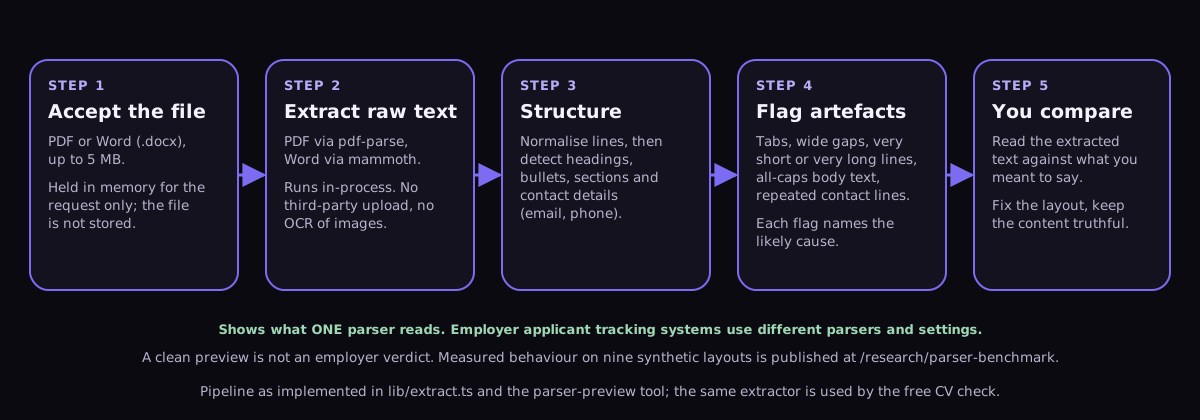
Each file is read by lib/extract.ts, the same extractor the Luceria application uses when a document is uploaded (pdf-parse for PDF, mammoth for Word). Heading recognition uses Luceria's heading promotion (toEngineMarkdown) and the ATS engine's section detector. Layout artefact flags come from the free parser-preview tool's heuristics.
Measures
Token recall is the share of distinct expected content tokens of three or more characters found anywhere in the extracted text. Reading order is the share of expected lines recovered in the expected sequence, scored as the longest increasing subsequence of matched expected lines over all expected lines; an extracted line holding more than 30 characters of an expected line longer than 40 characters counts as recovering that whole line, so a line the extractor split in two still counts. In this run 20 expected lines across six PDFs were credited that way; the Word files had none. Scored strictly on whole lines, the PDF scores would be 90.9% (single column), 90.9% (decorative bullets), 36.4% (sidebar first), 59.1% (main column first), 68.2% (tabular experience) and 90.9% (two pages), and the mean across all nine fixtures 76.3% rather than 85.9%; the Word scores do not change. Bullets recovered counts expected bullet sentences found verbatim after normalisation. Headings recognised counts the four section headings that were promoted to headings. Contact readability records whether the fictional email address and phone number appear in the extracted text.
Reproduction
Running the runner regenerates every fixture, extracts it, measures it and rewrites results.json, expected.json, fixtures.zip and the markdown summary. Results are deterministic apart from timing. The method version changes whenever a fixture, measure or extractor dependency changes, and earlier results are kept under their version.
Limitations
- Synthetic fixtures with one fictional resume in nine layouts cannot represent every template, font or authoring tool; real documents vary more.
- This measures Luceria's own extractor and heading recognition. It does not test any employer's applicant tracking system, which may use a different parser with different behaviour, and it cannot predict hiring outcomes.
- Scanned, image-only PDFs are excluded; the extractor reports them as unreadable by design rather than guessing text.
- Reading order credits a line the extractor split in two when a fragment holds more than 30 characters of it, so it is lenient on PDFs that break lines. Scored strictly on whole lines, the PDF scores would be 90.9% (single column), 90.9% (decorative bullets), 36.4% (sidebar first), 59.1% (main column first), 68.2% (tabular experience) and 90.9% (two pages), and the mean across all nine fixtures 76.3% rather than 85.9%; the Word scores do not change.
- One run on one machine; the timing figures inside results.json are indicative only.
Corrections
None so far. Spotted an error? Tell us and it will be checked against the data and recorded here.
Related documentation
- Greenhouse: unsuccessful resume parse (vendor documentation of parsing limits)Greenhouse Software · checked 4 November 2026
- Lever: understanding resume parsing (vendor documentation)Lever · checked 4 November 2026
Common questions
Does a good score here mean an employer's system will read my resume correctly?
No. Employers use many different parsers. The benchmark shows which layouts cause trouble for one real extractor, and the two-column and header-only patterns it exposes are the same patterns applicant-tracking vendors warn about in their own documentation.
Why measure Luceria's own parser rather than employer systems?
Because it is the only parser Luceria can run, publish and let others reproduce. Claims about employer systems Luceria cannot access would be guesses.
Keep going
- Preview what the parser reads from your own file
- Free resume structure check
- Tables, columns and graphics in a resume
- Where contact details belong
Published 6 November 2026 · Results are generated by code from version-controlled fixtures; the data files above are the record of what was measured. Write-up drafted with AI assistance and checked against Luceria’s editorial standards.